
Southlight I/O
Hello, and welcome to Southlight I/O - my one-man-band software studio, borne from the frustration of never finding “the perfect app”. And what better way to launch such a venture than to blog about it? Because that’s what I do apparently.
Southlight I/O has been an idea ever since I started using GitHub Copilot to design my websites, then new theme, which I blogged about in The Great 2026 Redesign. Then I got annoyed with the limitations placed onto me by WordPress and having my theme just-not-quite-there, so I put it into Claude Code. Lo and behold, the Claude immediately fixed everything! But I was still not happy. So I then used Claude to rebuild my site from the ground up. Which, I also blogged about in The Re-Re-Redesign.
What else could this amazing contraption do? I wondered to myself. Let’s put it to the test, I schemed. For you see, I had a PowerShell, that I had written by hand mind you, and it was a bit of a beast. It was made to sort out my legendary collection, approaching nigh of 5 terabytes, of photos. It used Exif tool, it had about 4 modules, and it was a bit of a headache to maintain. Add to this, I never really trusted it, so I never actually used it. But now a robot could come along and fix my mistakes! Oh frabjous day!
So into the robot went my PowerShell of Doom, and through many iterations, I got it really close to actually sorting out my photos. But one problem kept creeping up. It wasn’t very fast, there was no error correction, and most importantly, the script had now gotten so convoluted, that I could no longer, in good faith, maintain it should something go wrong.
I thought about putting it out to the public and having them fix it. But I’d never get around to actually merging the fixes into mine, so I gave up. Then… I had an idea…
Introducing Constellate
You see, dear reader, PowerShell was no longer fit for purpose. And five terabytes of photos is quite a large ask. But what was the right tool for the job? Every photo sorter app I tried had limitations, had issues and wanted you to pay for the most basic of basic tasks. That’s when I took matters into my own hands. And the result is what you see below.
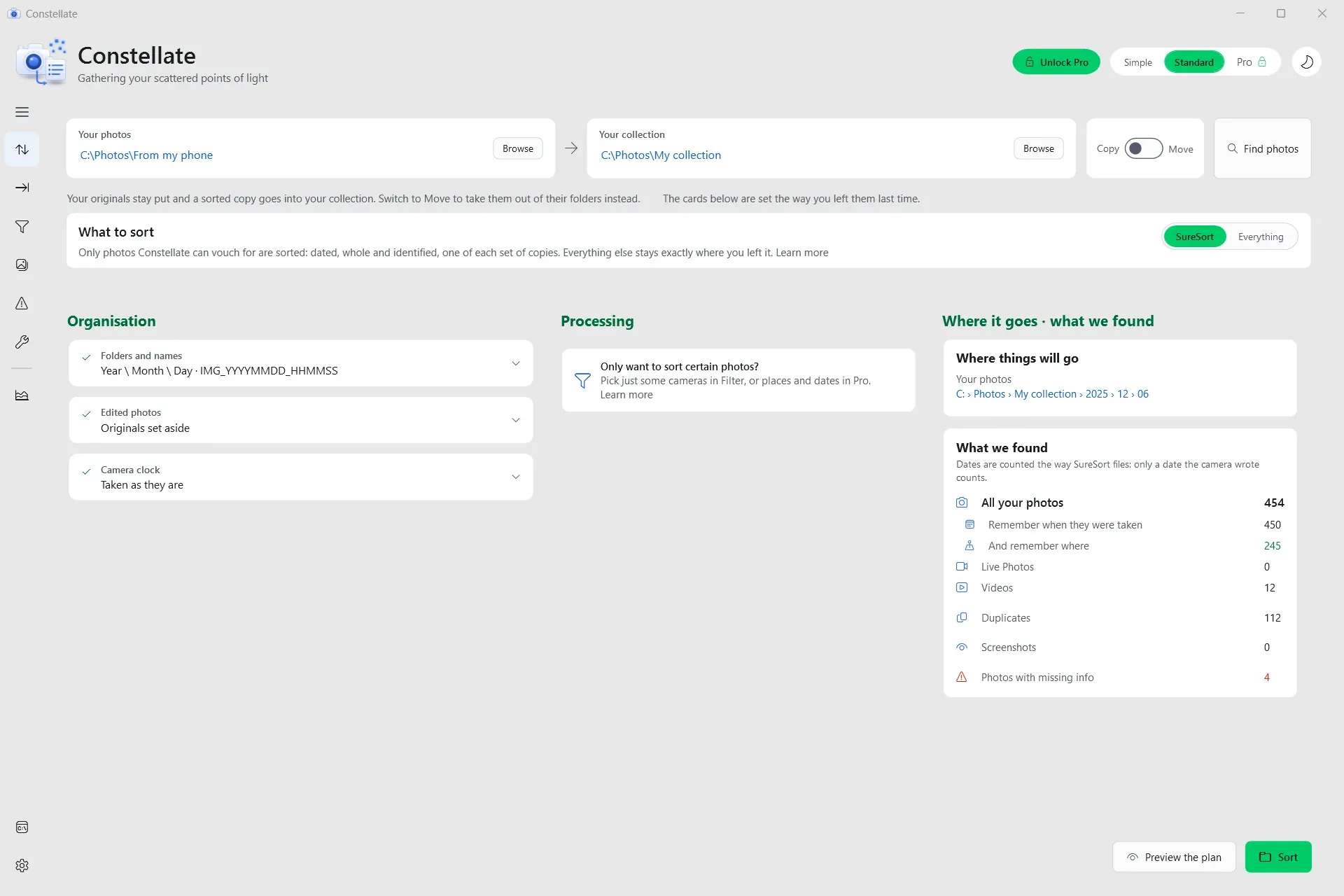
Hello Constellate - my very first official app!
Queue Flashback
The beginning of this story is as simple as things can get. A young, bright-eyed, albeit, naïve young man, wanted an app to take his photos from here to here while renaming them and also finding the duplicates. Simple right? Oh ho!
No.
In my naivety, I thought - Apple does LivePhotos, surely it can’t be that hard to put the photo and video back together and then upload it to iCloud (finally getting back to The iCloud Photo Project you see). And so began long nights of researching just how Apple pairs the LivePhotos, what makes a LivePhoto and why iCloud for Windows can’t upload LivePhotos…
Then after that was sorted, another thought popped up - when you take photos with a real camera, you get a RAW and a JPG file. Wouldn’t it be cool if the app found them and put them together again. Or what if the app could take them apart and move the RAW files to one place, but keep the JPG?
Then, oh woe is me, I came across something I never could have anticipated, except that it was entirely my own doing and I remember the night I did it like it was yesterday. It wasn’t yesterday in case you were wondering. It was back in 2023. And it was half the reason I started this behemoth of a PowerShell script in the first place…
Flashback Within A Flashback
Now we’re really meta.
One night I was trying to organise my photos using Adobe Bridge. I couldn’t quite come up with a good naming scheme, and was going back and forth wondering what a cool looking, but functional, naming scheme for photos could be. Apple does the very uninspired IMG_####. Serious photographers do the Place_IMG-Date. And some monsters even do Camera-Date-Place-Name-Number, or some combination of that. I also had a hard drive containing 1 whole terabyte of photos, which I was convinced was going to die. So I needed to do something. And quick.
Lo and behold, I came up with the amazing, and correct, and not wrong in any way, and who could have seen this coming, and I am not a hipster, method of naming my photos with periods. Please, please, dear reader, hold your gasps. I know, in hindsight, naming a photo IMG.Date.Time.Extension is not a great idea, but who knew? We were all so innocent and young at the time.
What this means in practice was my photos were going to be named IMG.20041202.123456.JPG for a photo that was taken in 2004, December (12) on the 2nd at the time of 12:34:56. It seemed perfect. That is until Adobe Bridge, in its helpfulness, saw these periods, not as placeholders, oh no. But as the end of the file. And in doing so, completely dropped the .JPG from about 55,000 photos.
Suddenly, every photo I owned could no longer tell me if it was a video, a photo, shot on iPhone, shot on Windows Phone, or anything for it was named .Time as the extension. In my haste to get them back, because Bridge doesn’t have a control-undo, I selected all - Control-A - and renamed them as .heic - the format Apple uses for their photos.
I know, I can feel your sweaty hands from here, eager to rush to the comments and berate me. I suspect I knew this when I turned off the comments on my new site. But alas. The damage was done. Every photo, no matter if it was a JPG, a MOV, a CR2, an ARW or an MP3 was now a very simple .heic. I could see my photos, so I didn’t mind. Oh my sweet summer child, if only I knew…
Back To Previous Flashback
And so the PowerShell script started as a way to find what the original file was and restore that. But having moved my storage from cloud to cloud, and then to NAS and NAS, I now had about 2 million photos… Mostly duplicates. Finding what each one was originally - well that was going to take the computer being a computer and doing computer things.
The script did its bit, but it took almost an entire week to run, and all it did was correct the extensions. It didn’t name, or sort. It should be easy to add that, surely?
We Need An App
PowerShell is great. It could have done all this. It would have taken close to 2 weeks to run, and it could have ended there. But I wanted more. I wanted the Swiss-army knife of photo sorting apps. I wanted ultimate control. I wanted a way to tell the computer to use 100% of its compute and actually power through these photos as quickly and as efficiently as possible.
So I did what anyone would do. I wrote down all my specifications, I went into detail how I wanted it to work, how I wanted it to look, and function, and feel, and talk to me, and worked with the robots to build an app. It took far longer than I could have thought, but the end result is something I am proud of. The real Swiss army knife of photo sorting apps.
One of the things I am most proud of - 90% of the entire app is free. Sorting, fixing, pairing LivePhotos (which no other app that I know of does), pairing RAW and JPG, finding near-duplicates, finding actual duplicates, and even writing XMP data into your photos - all free. You can download and use the app right now, and it won’t cost you a cent.
But if you’re like me, and you want ultimate control, well then my friend, that comes at a cost. The cost of my sanity during this project. And it turns out, my sanity has a price tag. $15.99 USD actually. Which, to be fair, is really undercutting the market here. And its not a subscription. No sir. One time fee and the app is yours forever. Download and use it on any computer you have from here until computers cease to exist. It’s yours. You own it. Just like in the before times.
And one thing I promise - for the life of Constellate V2 - all updates, will be free. And boy, do I have a lot of updates planned. About 16 weeks worth of things I never got around to. Of course, if you want to support me and not buy the app, then a download and review on the Windows Store is all it takes.
Wrap Up
Southlight I/O is now a real software studio with a real app on the Windows Store, and a Web App you can use, all for free. I have big plans for both, with at least 3 more apps in the works as we speak. These will be released when they’re ready and not a moment too soon. If you’re keen to be a tester, let me know!
For now, Constellate is my focus. There’s a lot to worry about when launching an app on the Windows Store, and a lot of bugs one needs to fix and test. So work continues. I’ve already put out the 3rd update to the launch version, and as I said previously, have a bunch more features I am working on to really make this the one stop shop for photo sorting. Check out the website - I think there’s a roadmap there… somewhere.
For now, please, download Constellate from the Windows Store, leave a review, and if so inclined, support me by sharing the app, or buying the Pro Unlock. It would mean the world to me if you did, and also help me continue on this journey of making apps I want to use.
We’re entering the golden age of apps and I am just getting started.
Yours truly,
Kyle